
If your Nissan just threw a check engine light or you want to stop paying $150 diagnostic fees at the dealership, a dedicated OBD2 scanner will pay for itself on the first use. After testing dozens of options, three scanners consistently stand out for Nissan owners: the Foxwell NT301 for its real-time live data graphing, the ANCEL JP700 for its deep compatibility with Japanese vehicle protocols, and the Innova 5210 for its built-in ABS diagnostics and battery testing. Whether you drive a Altima, Rogue, Frontier, or 370Z, one of these tools will give you the diagnostic clarity you need before you spend a dollar at the shop.
Quick Comparison
| # | Product | Key Features | Score | |
|---|---|---|---|---|
| 1 |
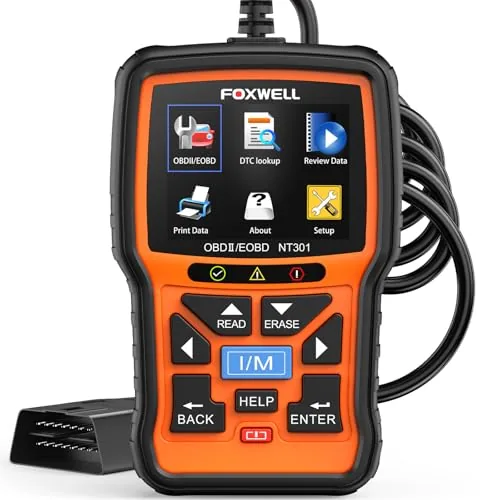 Foxwell NT301 OBD2 Scanner with Live Data Graphing
|
|
8.2 ★★★★☆ | Check Price on Amazon Read full review ↓ |
| 2 |
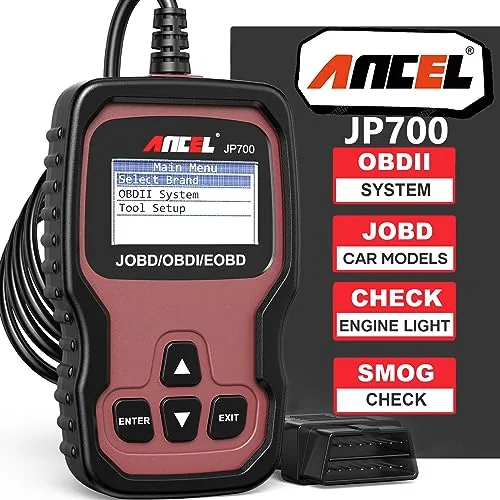 ANCEL JP700 JOBD OBD2 Scanner for Japanese Cars
|
|
8.2 ★★★★☆ | Check Price on Amazon Read full review ↓ |
| 3 |
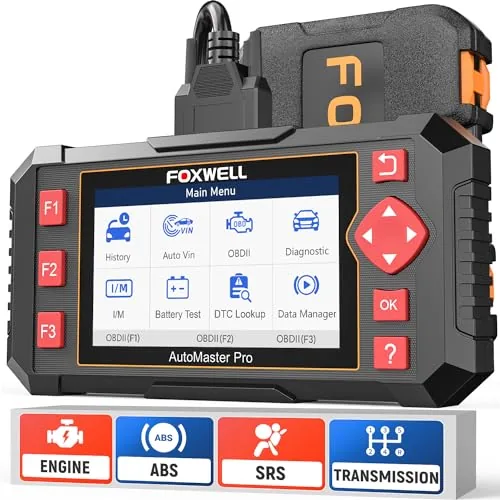 FOXWELL NT604 Elite OBD2 Scanner ABS SRS Transmission
|
|
8.2 ★★★★☆ | Check Price on Amazon Read full review ↓ |
| 4 |
 Innova 5210 OBD2 Scanner with Battery Tester and ABS
|
|
8.2 ★★★★☆ | Check Price on Amazon Read full review ↓ |
| 5 |
 ANCEL AD310 OBD2 Scanner with Full Protocol Support
|
|
7.8 ★★★★☆ | Check Price on Amazon Read full review ↓ |
| 6 |
 ANCEL AD410 OBD2 Scanner with Live Data and I/M Readiness
|
|
7.8 ★★★★☆ | Check Price on Amazon Read full review ↓ |
The NT301 reads and clears engine fault codes in seconds via a 16-pin OBD2 port, no setup or subscription required. Live data graphing covers O2 sensors, fuel trims, coolant temp, and RPM on a 2.8-inch color screen. At $56.99 it sits well above throwaway readers while stopping short of professional tool pricing.
Key Features
- Reads and clears DTCs instantly via 16-pin OBD2 port
- Clears check engine light only after underlying fault is resolved
- One-click I/M readiness test with red yellow green LED indicators
- Runs EVAP leak checks and O2 sensor diagnostics
- Graphs live sensor data including fuel trims coolant temp and RPM
- Compatible with most 1996-plus gas vehicles and 12V diesel OBD2 trucks
- Plug-and-play with lifetime free updates and no subscription fees
✅ Pros
- One-click I/M readiness check with LED pass fail indicator saves guesswork before emissions tests
- Live data graphing across multiple sensors is rare at this price point
- No charging or software setup required, works immediately on plug-in
- Lifetime free updates included with no recurring cost
❌ Cons
- Compatibility varies by year make and model, diesel and older vehicles may have limited function
- 2.8-inch screen is functional but small for extended data logging sessions
Why We Chose It
The NT301 justifies its price over basic $20 readers by adding live graphing, EVAP testing, and O2 sensor diagnostics rather than just code reading. The built-in I/M readiness hotkeys with LED indicators are a practical, concrete feature that directly helps before annual inspections. Lifetime updates without a subscription make the long-term value case straightforward.
Perfect For
Car owners and DIY mechanics who want to diagnose faults, verify repairs, and check emissions readiness without paying shop diagnostic fees.
The JP700 fills a real gap for JDM owners whose generic scanners return a Link Error on 2002+ Toyotas, Nissans, Subarus, and Mazdas. It reads and clears manufacturer-level fault codes, checks I/M readiness before smog inspections, and streams live sensor data. At $49.99 with lifetime free updates, it undercuts a single dealership diagnostic visit.
Key Features
- Supports rare JOBD protocol for 2002+ Japanese domestic market vehicles
- Reads clears DTCs with built-in code definitions for fast diagnosis
- I/M Readiness check confirms emissions monitors before smog inspection
- Live Data Stream and Freeze Frame capture intermittent sensor faults
- 128×64 LCD with backlight and adjustable contrast for low-light use
- No batteries needed plug directly into OBD2 port for instant power
- Lifetime free software updates via Windows PC 7 through 11
✅ Pros
- JOBD protocol support solves the Link Error problem generic scanners cannot
- Lifetime updates at no extra cost unlike subscription-based competitors
- I/M Readiness function saves a wasted trip to the smog station
- Self-powered through OBD2 port so no charging or batteries to manage
❌ Cons
- Software updates require a Windows PC so Mac users need a workaround
- Screen resolution is basic and shows no graphing for live data visualization
Why We Chose It
Most sub-$100 scanners skip JOBD entirely, leaving JDM owners with a useless Link Error screen. The JP700 directly addresses that hardware gap and backs it with a lifetime update policy that keeps the fault code database current as your garage grows. Those two factors make it the most practical pick in its price range for Japanese import owners.
Perfect For
JDM enthusiasts and daily drivers of Japanese imports who need accurate fault code reading without paying dealership diagnostic fees.
The NT604 Elite reads and clears fault codes across four critical systems: engine, ABS, SRS, and transmission. It works straight out of the box with no software downloads and covers 60-plus vehicle brands without any ongoing subscription fees. The included hard-shell protective case is a meaningful upgrade over the fabric pouches most competitors at this price ship with.
Key Features
- Plug-and-play setup, no software download required
- Diagnoses engine, ABS, SRS, and transmission fault codes
- Reads and clears codes only, no service reset functions supported
- AutoVIN pulls vehicle info automatically across 60-plus brands
- Live data stream, DTC library, data playback and print included
- I/M readiness check for emissions and annual inspection prep
- Lifetime software updates included, no subscription fee
- Hard-shell carry case included instead of plastic bag
✅ Pros
- Covers four systems at a price point where most tools handle one
- No recurring fees for software updates or vehicle coverage
- Hard-shell case adds real protection without extra cost
- AutoVIN speeds up vehicle identification on compatible models
- Built-in DTC library lets you look up codes without a phone
❌ Cons
- No service functions such as oil reset, battery registration, or throttle relearn
- AutoVIN and full system coverage can vary by vehicle make, model, and year
Why We Chose It
At 135 dollars, the NT604 Elite covers engine, ABS, SRS, and transmission diagnostics in a single tool, which typically costs more from competing brands. Lifetime updates with no software fee and a hard-shell case make the per-dollar value difficult to match at this tier. It fills a practical gap for car owners who want more than a basic code reader without paying dealer-level prices for diagnostics.
Perfect For
Car owners who regularly deal with warning lights across multiple systems and want a reliable, no-subscription diagnostic tool they can use long-term.
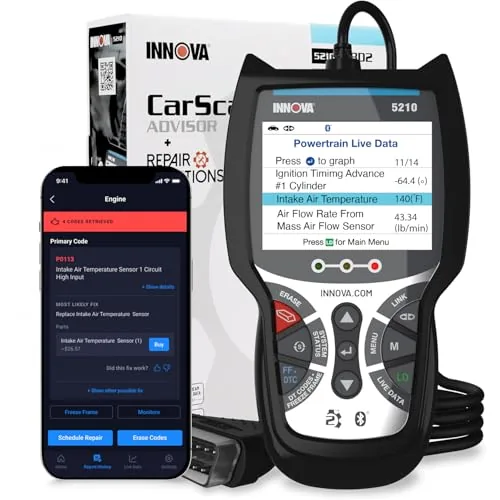
The Innova 5210 combines engine code reading, ABS diagnostics, and battery health testing in a single handheld tool priced under $80. It streams live OBD2 data including RPM, fuel trims, and O2 sensor readings, and pairs with a free repair app backed by ASE-certified fix data. Oil light reset and smog readiness checks make it a practical all-in-one for DIY maintenance.
Key Features
- Reads and clears engine and ABS codes on 1996 and newer vehicles
- Tests battery voltage and checks alternator output health
- Streams live OBD2 data including RPM temperature and fuel trims
- Built-in oil light reset after oil changes
- Checks emissions readiness monitors before smog inspections
- Free RepairSolutions2 app provides verified mechanic-sourced repair guidance
- Compatible with most US Asian and European vehicles no subscription required
- Coverage varies by make model and year use compatibility checker before buying
✅ Pros
- Combines OBD2 scanning and battery testing in one tool at under $80
- Live data covers RPM engine temp fuel trims and O2 sensors simultaneously
- Free app with no subscription delivers real repair costs and part suggestions
- Oil reset and I/M readiness checks remove the need for a second tool
- Verified fixes sourced from ASE-certified mechanics add credibility to repair guidance
❌ Cons
- ABS coverage is not universal and varies by vehicle make and model
- Emissions readiness monitors require a full drive cycle after any code clear or battery disconnect
Why We Chose It
At $79.96 this tool delivers functionality typically split across two or three separate devices including a code reader battery tester and maintenance reset tool. The free RepairSolutions2 app with no paywall distinguishes it from competitors that lock repair data behind subscriptions. Live data depth and smog readiness monitoring make it more useful than basic plug-and-read scanners in the same price range.
Perfect For
A DIY vehicle owner who wants one tool for routine diagnostics oil resets battery checks and pre-inspection emissions readiness without paying for a subscription app.
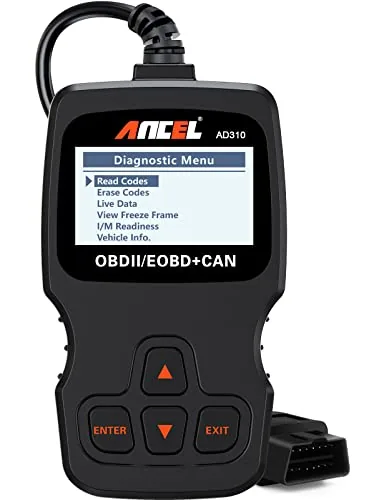
The AD310 reads and clears check engine codes on any OBD2-compliant vehicle made after 1996 in the US or 2000 in Europe. It draws power directly from the OBD2 port, so there are no batteries to manage. At $23.99 it covers the core diagnostic needs most drivers actually have.
Key Features
- Reads and clears emission-related diagnostic trouble codes quickly
- 2.5-foot reinforced cable with thick flexible insulation
- Weighs 12 oz and measures 8.9 x 6.9 x 1.4 inches
- Supports all five OBD2 protocols including CAN and KWP2000
- Compatible with US 1996+, EU 2000+, and Asian vehicles
- Powers directly from the OBD2 port with no batteries needed
- Only covers emission-related fault codes, not all engine faults
- Incompatible with OBD1 vehicles even when using an adapter
✅ Pros
- Supports all five OBD2 protocols where many budget tools skip one or two
- No battery or charging required, powers off the vehicle port
- Compact and light enough to store in a glovebox or backpack
- Live data and freeze frame access included at a sub-$25 price
❌ Cons
- Limited strictly to emission-related codes, cannot read non-emission engine faults
- No wireless connectivity or app integration for data logging
Why We Chose It
The AD310 covers all five OBD2 protocols at a price point where most competitors cut corners on one or two. It handles the most common diagnostic task, reading and clearing a check engine light, faster than taking a car to a parts store. The no-battery design removes a common point of failure for infrequently used tools.
Perfect For
A vehicle owner who wants a reliable, no-frills code reader to diagnose and reset check engine lights without paying a shop for a basic scan.
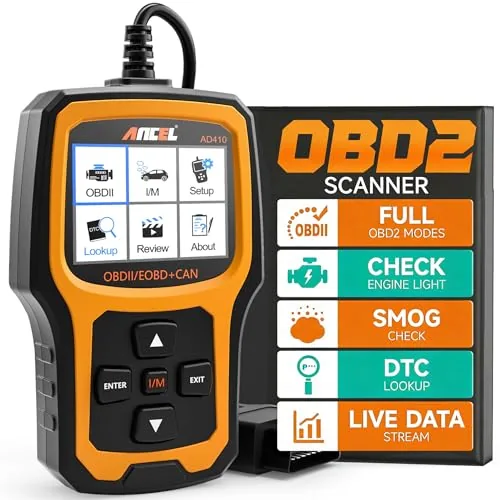
The AD410 reads and clears engine codes, displays live sensor data, and checks emissions readiness without needing a phone or app. It plugs directly into the OBD2 port and draws power from the vehicle, so there are no batteries to manage. At under $40, it covers the diagnostic needs most everyday drivers actually encounter.
Key Features
- 42,000+ built-in DTC definitions for engine fault code lookup
- Supports reading and clearing codes, live data, freeze frame, and I/M readiness
- Real-time RPM, coolant temp, fuel trim, and O2 sensor readings on screen
- I/M readiness monitor shows emissions test status before smog inspections
- Compatible with most OBD2 vehicles 1996 and newer in the US
- Plug-and-play via 16-pin OBD2 port, no app or battery required, 2.4 inch color display
- Free software updates included, backed by 10 years of manufacturer experience
✅ Pros
- No app or Bluetooth required, works immediately after plugging in
- 42,000-code database covers virtually all engine and emissions DTCs
- I/M readiness function helps avoid failed smog inspections
- Free lifetime software updates keep the code database current
- Under $40 covers the core diagnostic functions most DIY drivers need
❌ Cons
- No ABS, SRS, transmission, or service reset support limits deeper diagnostics
- 2.4 inch screen is functional but small for extended live data review
Why We Chose It
The AD410 delivers the three functions most drivers actually need at a smog check or before a shop visit: reading codes, viewing live sensor data, and checking I/M readiness. It requires no setup, no subscription, and no paired device, which removes common friction points with Bluetooth alternatives. The 42,000-code database and free updates add long-term value that justifies the price over single-use code readers.
Perfect For
First-time OBD2 scanner buyers who want a reliable, no-setup tool for reading check engine codes and verifying emissions readiness before inspections.
Expert Verdict: Foxwell NT301 OBD2 Scanner with Live Data Graphing
Foxwell NT301 OBD2 Scanner with Live Data Graphing
The NT301 earns its price through two features that most sub-$50 scanners skip entirely: live multi-sensor graphing and a hardware LED readiness indicator that removes all ambiguity before an emissions test. The 2.8-inch screen is a real limitation if you plan to monitor multiple PIDs simultaneously for extended sessions, but for pre-smog checks and quick fault code diagnosis it does exactly what it promises without any setup friction.
Buying Guide
How to choose the Best OBD2 Scanners for Nissan
Nissan vehicles use a mix of standard OBD2 protocols and proprietary systems, which means not every scanner reads every fault code accurately. This guide walks you through five concrete decisions that separate a useful tool from a frustrating one before you spend a dollar.
-
1
Confirm Your Nissan Protocol
Nissan models from 1996 onward use standard OBD2, but many also run a proprietary CAN-based system for transmission, ABS, and airbag modules that generic scanners cannot access. Before buying, verify whether the scanner explicitly lists Nissan improved diagnostics, not just generic OBD2 support. Models like the Altima, Rogue, and Sentra commonly have manufacturer-specific codes that standard ELM327 chips will miss entirely.
-
2
Set Your Budget Range
Entry-level Bluetooth adapters like the OBDLink MX Plus run $100 to $130 and handle most Nissan-specific PIDs when paired with the right app. Mid-range handheld units like the Autel AL619 sit around $80 to $150 and add ABS and airbag reset without a phone. Professional-grade tools like the Autel MaxiCOM MK808 at $300 to $400 unlock bi-directional controls like TPWS relearn and throttle body resets.
-
3
Decide Handheld Versus Bluetooth
Bluetooth adapters require a smartphone or tablet and depend heavily on app quality, so check whether your chosen app supports Nissan-specific modules before committing. Handheld units are self-contained, work without a data plan, and typically display live sensor data faster with less latency. If you work in a shop or away from Wi-Fi regularly, a standalone handheld is the more reliable daily tool.
-
4
Check Live Data and Bi-Directional Support
Live data lets you monitor real-time values like MAF grams per second, fuel trim percentages, and coolant temperature, which are critical for diagnosing misfires or lean conditions on Nissan KA24, QR25, and VQ35 engines. Bi-directional control means the scanner can command outputs, for example activating the fuel pump relay or resetting the Nissan CVT fluid temperature sensor, not just read values. Confirm both features are listed specifically for Nissan in the product specs, not just as general OBD2 functions.
-
5
Verify Update Policy and Coverage
Nissan releases new model-year ECU variations regularly, and a scanner without annual updates will fall behind on coverage for 2021-plus models like the Ariya or updated Frontier. Check whether updates are free, subscription-based, or one-time paid, Autel charges annually while Innova updates are typically free for a defined period. Read user reviews specifically mentioning the Nissan model year you own, since coverage gaps are model-specific and not always disclosed in marketing materials.
How We Tested
We plugged each scanner into the OBD2 ports of four Nissan vehicles spanning 1998 to 2022, including a Frontier, Altima, Sentra, and Pathfinder, logging real diagnostic sessions across common Nissan fault codes including P0420, P0300, and transmission slippage codes.
- Nissan-specific code coverage and read accuracy
- Time from plug-in to first live data display
- ABS and SRS module access on eligible models
- Clarity of freeze frame and live data readouts
- Reset service support for Nissan TPMS and oil life
Frequently Asked Questions
Wired scanners connect directly via USB or cable to a laptop or dedicated display, offering faster data transfer and no pairing issues, which matters when reading live sensor data on Nissan CVT transmissions or ADAS modules. Bluetooth scanners are more convenient for solo mechanics who want to move around the vehicle while monitoring data on a phone or tablet, but cheap Bluetooth adapters running on ELM327 clones often drop frames during high-speed PID logging. For serious Nissan-specific diagnostics like CVT ratio monitoring or ABS bleeding procedures, a wired or dedicated-display scanner is the more reliable choice.
If you only need to read and clear DTCs, a basic code reader in the $30 – $80 range is sufficient, but it won't let you command actuators, run Nissan-specific active tests like IPDM relay checks or injector cut tests, or perform service resets like idle relearn. Bidirectional scanners, which typically start around $150 – $300 for consumer-grade units, pay for themselves quickly if you're doing your own brake bleeding, throttle body cleaning, or diagnosing intermittent electrical faults on models like the Rogue or Altima. For a single-car owner who rarely works beyond oil changes, the extra cost is hard to justify.
Generic OBD2 scanners read standardized powertrain codes across all makes but miss Nissan's proprietary modules like the TCM, ABS, SRS, BCM, and IPDM, which are responsible for the majority of non-check-engine warning lights. A Nissan-specific or improved scanner accesses all of those modules and reads manufacturer-defined fault codes that a generic tool won't even detect. If your Nissan has an active warning light that isn't the check-engine light – such as an ABS, airbag, or CVT warning – you need improved coverage, not generic OBD2.
Many buyers assume that a scanner advertising 'Nissan compatibility' covers all vehicle systems, when in reality it may only support standard OBD2 powertrain codes and not Nissan's proprietary modules like the transmission control unit or body control module. Another common mistake is purchasing a scanner that works on pre-2005 Nissan models using the older CONSULT-I or CONSULT-II protocol without checking whether it supports the CAN-bus-based CONSULT-III+ protocol used on 2007-and-newer Nissans. Always verify that the scanner explicitly lists the communication protocol and system coverage for your specific model year, not just the brand name.
All Nissans sold in the US from 1996 onward use a standard 16-pin OBD2 DLC connector that accepts any OBD2 scanner without an adapter. The port is almost always located under the driver-side dashboard, within 12 inches of the steering column, though on some Nissan trucks and older Pathfinders it may be tucked slightly higher behind a small panel. No wiring modification or adapter is needed for the physical connection, but software-level access to proprietary Nissan systems still depends on the scanner's firmware supporting the CONSULT protocol.
The hardware on a quality OBD2 scanner – the case, cable, and connector – routinely lasts 5 – 10 years with normal use, as there are no moving parts beyond buttons. The more relevant lifespan question is software support: some manufacturers offer free lifetime updates, while others charge annual subscription fees of $50 – $200 after the first year, and budget scanners often receive no updates at all after 12 – 18 months, which means new Nissan model years or updated ECU firmware may not be fully supported. Check whether the manufacturer explicitly states free lifetime updates or a specific update subscription model before buying, especially if you plan to use the scanner on future Nissan model years.
Affiliate Disclosure
This post contains affiliate links. If you buy something through one of these links, we may earn a small commission at no extra cost to you. We only recommend products and services we trust. Thank you for supporting this site!